 Slidescovery
Slidescovery とは? What is Slidescovery?
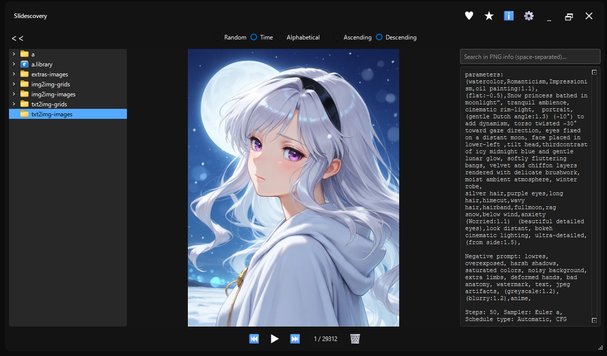
Slidescovery は、膨大な画像を スライドショー で軽快に閲覧しながら、
お気に入り仕分け・PNG メタ検索 がサクサク行えるデスクトップアプリです。
Slidescovery is a desktop application that allows you to browse a large number of images in a slideshow,
and easily sort your favorites and search for PNG metadata.
主な機能 Main Features
🖼️ 直感的なスライドショーIntuitive Slideshow
- 矢印キー / ホイールでパパっと移動Move quickly with arrow keys / wheel
- 一時停止・再開は p でワンタップPause/resume with a single tap of p
- スライド間隔を 0.5〜60 秒で自由設定Freely set the slide interval from 0.5 to 60 seconds
🔍 PNG メタデータ検索PNG Metadata Search
- AI 生成画像の
promptなどをリアルタイム表示Real-time display ofpromptfor AI-generated images - 複数キーワード AND 検索 & 自動スキップMulti-keyword AND search & auto-skip
📁 スマートフォルダナビSmart Folder Navigation
- ツリービュー折りたたみで画面を広々活用Utilize the screen widely by collapsing the tree view
- ドラッグ&ドロップで即対象フォルダを登録Register the target folder immediately by drag & drop
✨ 画像仕分けワンクリックOne-click Image Sorting
- ♥ お気に入り / ★ いいね / 🗑 ゴミ箱 の 3 ルートへ即移動Move to 3 routes immediately: ♥ Favorites / ★ Likes / 🗑 Trash
- 誤削除防止の確認ダイアログ (ON/OFF 可)Confirmation dialog to prevent accidental deletion (ON/OFF available)
使い方 (クイックスタート) How to Use (Quick Start)
- 初回起動で 画像ソースフォルダ を選択Select the image source folder on first startup
- スライドショー開始 → 矢印キー / ホイール で移動Start slideshow → Move with arrow keys / wheel
- 右上 ℹ️ で PNG 情報パネルを ON/OFFTurn the PNG info panel ON/OFF with ℹ️ in the upper right
- 検索バーへキーワード入力でハイライト表示 → 該当画像を高速ジャンプ(⚙️ メニューで「Skip to matching image」)をオンにしてください。デフォルトではオフになっています。)Enter keywords in the search bar to highlight them → Jump to the corresponding image at high speed (Please turn on "Skip to matching image" in the ⚙️ menu. It is off by default.)
4. 基本操作 4. Basic Operations
| アクションAction | マウス / ボタンMouse / Button | キーボードKeyboard |
|---|---|---|
| 次へ / 前へNext / Previous | ⏭ / ⏮ | → / ← |
| ランダム移動Random Move | — | ↓ / ↑ |
| 一時停止 / 再開Pause / Resume | ⏸ | P |
| スライド間隔変更Change Slide Interval | ⚙️ → Set Interval | — |
| フルスクリーン切替Toggle Fullscreen | 画像をダブルクリックDouble-click the image | F11 |
| エクスプローラーで画像を確認Show Image in Explorer | 画像を右クリックRight-click the image | — |
| エクスプローラーでフォルダを確認Show Folder in Explorer | フォルダを右クリックRight-click the folder | — |
| お気に入りへコピーCopy to Favorites | ♥ | 1 |
| いいねへコピーCopy to Likes | ★ | 2 |
| ゴミ箱へ移動Move to Trash | 🗑 | Del |
| 情報ペイン表示Show Info Pane | ℹ️ | I |
| ツリー折りたたみCollapse Tree | « | — |
| 終了Exit | ✕ | Esc |
ライセンス情報License Information
このアプリケーションは、以下のオープンソースライブラリを使用しています。This application uses the following open source libraries.
PyQt6
ライセンス: GNU General Public License v3 (GPLv3)
Copyright © 2023 Riverbank Computing Limited
PyQt6のソースコードはこちらから入手できます。License: GNU General Public License v3 (GPLv3)
Copyright © 2023 Riverbank Computing Limited
The source code for PyQt6 is available here.
Pillow
ライセンス: HPND License
Copyright © 2010-2023 Alex Clark and contributorsLicense: HPND License
Copyright © 2010-2023 Alex Clark and contributors
send2trash
ライセンス: BSD License
Copyright © 2012, Copyright 2009, 2010 by authorsLicense: BSD License
Copyright © 2012, Copyright 2009, 2010 by authors
各ライブラリのライセンス条文の詳細は、アプリケーションに同梱のLICENSE.txtをご確認ください。For details on the license terms of each library, please check the LICENSE.txt file included with the application.